
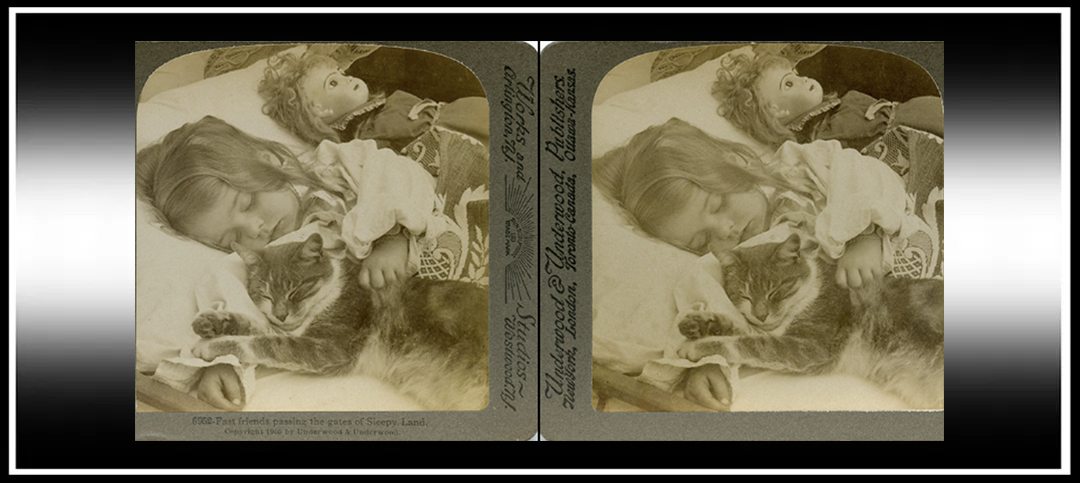
The amazing Masuji Suto has done it again, and has created a free extension for the Chrome browser on PC and Mac, which will let you view a parallel-view image or video as a cross-view, and vice-versa, depending on your preference.
He’s renowned for making making excellent free apps for stereoscopic 3-D images and videos, and I really recommend you visit his website as there are more available, such as StereoPhoto Maker, and the new SpatialPhoto Maker for Macs: https://stereo.jpn.org/eng/index.html
The SBS Image Swapper browser extension will be especially useful for those who have a preferred way of viewing side-by-side stereoscopic images, particularly if you’re a natural cross-viewer in a parallel-view world (reading that back, I can’t believe how geeky it sounds).
Step-By-Step Guide to SBS Image Swapper (with photos from a Mac Install)
Installation
- Download the browser extension from the website https://suto.bex.jp/chrome/index.html
- Extract the zip file ‘swap012.zip’ (or whichever version number is current).
- If you haven’t already, download the Google Chrome browser: https://www.google.com/intl/en_uk/chrome/
- Open ‘chrome://extensions/’ in Google Chrome.

- Enable ‘Developer Mode’ using the top right toggle.

- Click ‘Load Unpacked’ and select the extracted ‘swap012’ file.


- Ensure the extension ‘SBS Image Swapper’ is enabled through the toggle.

Swapping the Side-by-Side Image/Videos
- Find a side-by-side image or video in the Chrome browser.
- Right click or control right click, and select ‘Swap SBS’.


- Or click ‘Alt’ and left click, or on Macs, click ‘Option’ and left Click to instantly swap the format.


(Thanks to Michael Taylor for the video to test on!)
I’ve been using this extension for a week and I’m really impressed with it. Thank you so much again to Masuji Suto for freely sharing his knowledge, talent and skill in creating essential 3-D apps, and through them, making stereoscopy so accessible to so many!
Also released this month is another browser extension which allows you to change stereoscopic 3-D formats, including anaglyph and more, is the ‘Universal 3D Viewer’, which is said to work for Chrome and Edge browsers. I have to add a disclaimer that I’ve not tried it myself, so I can’t comment on its functionality, but please see Dave’s information in the comment section below (thank you so much Dave!).
From the developer NicLouApps:
| Universal 3D Viewer is a robust and innovative browser extension designed to transform your online experience by enabling seamless 3D video and image conversion directly within your browser. At its core, Universal 3D Viewer offers comprehensive support for essential stereoscopic input formats such as Side-by-Side (SBS), Over-Under (OU), and traditional 3D content, allowing you to convert and render these formats fluidly. It provides flexible output options including anaglyph (Dubois), SBS, VR modes, and other popular 3D display formats. This flexibility ensures that your 3D content looks its best, tailored perfectly to your hardware capabilities and personal preferences. Key Features: – Universal 3D Conversion: Supports essential stereoscopic input formats including Side-by-Side (SBS), Over-Under (OU), and traditional 3D. – Flexible Output Formats: Instantly switch between anaglyph (Dubois), SBS, VR mode, and other popular 3D display methods. – Easy Settings Popup: Attractive and localized interface (English & Portuguese) with dropdowns and toggles for straightforward customization. – One-Click Controls: Floating overlay controls directly injected into web pages for convenient and immediate access. – Real-Time Updates: Changes you make apply instantly across all active tabs without needing a refresh. |

Copyright © The Stereoscopy Blog. All rights reserved.
 The Stereoscopy Blog
Note to add that Universal 3D Viewer works on Android using Edge Mobile (beta version only) available in Google Play store. I haven’t tested Suto-san’s plugin with it. No luck so far with either on iOS, sadly.
LikeLiked by 1 person
Thank you so much for the info Dave, much appreciated 🙂
LikeLike