

I’m so happy to welcome to The Stereoscopy Blog my friend Thomas Asch. I’ve known Thomas for many years and he has always been so generous with his experience and help, I have a lot to thank him for. He has also been a great inspiration to me with his incredible stereo-photography skills and humour. I’m proud to share his first article for the Blog, all about an affordable stereo camera rig.
_______________
An illustrated field experience review written by Thomas Asch, Zurich, Switzerland.
All stereo pictures are taken with the GoPro Dual HERO System by the author.
The GoPro is a typical action camera system which produces photos and videos, even in difficult circumstances, independent from weather conditions or even underwater. The GoPro Dual HERO System Housing couples two GoPro cameras with a perfectly synchronised operating system for taking both stereo photos and videos. This field report is limited to producing still photography as I have no experience (and no ambition) with taking 3D videos.
First of all, what is contained in this GoPro System?

These are the main components of the rig:
- GoPro Dual HERO System Housing (AHD3D-301), which includes the orange Sync unit (Attention: there is also another version of a Housing system on the market for even older GoPro camera types, this will not work with the GoPro 3+ Black Editions!)
- 2 x GoPro HERO 3+ Black Edition Cameras (only this model works in this system and these are sold separately to the Dual HERO System Housing)
The Housing has a fixed stereo base of 34mm or 1.34in.
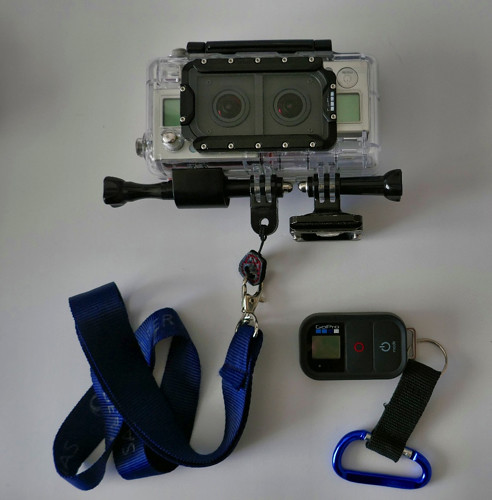
To complete the Rig ready for shooting, I recommend:
- a strap which you can wrap around your wrist while taking pics and
- an arca swiss plate for the quick mounting on a tripod. It’s also gives you a good grip to hold your camera with whilst shooting.
The standard GoPro remote control is useful for tripod sessions.
Here are some specs of the GoPro HERO 3+ Black Edition: 12 megapixels, CMOS sensor, Wide-angle lens f/2.8, focus free, to use with a microSD card.
Where to get the GoPro system
GoPro Cameras and and the Dual HERO System Housing are frequently offered on eBay or similar platforms. All components can usually be purchased nowadays for a total of around $300. Often the cameras come with the remote control and additional accessories, like substitute batteries, cables, charging units, mounting aids, etc.
How to take photos with the GoPro HERO System
No Rangefinder. As a spoiled photographer with today’s equipment the first deficit you will realize is: The GoPro 3+ camera has no built in rear screen or range finder. The rear screen for the GoPro 3+, which is available as add on, doesn’t fit into the Dual housing. The possibility to use the GoPro app on the smart phone as a range finder is normally not compatible with spontaneous photo sessions. So the best way is to get practise in shooting “blind” and fix the final detail view by cropping. You will see, after a while it works very well!
This is a sample of “blind shooting” with the rig near the ground:

There is nothing to configure on the camera before taking your pics, so fully focus on your stereo idea and the subject: You press the button and the GoPro does the rest…
Perfect Synchronisation The excellent synchronisation of the two GoPros 3+ is managed through a hardware module which is part of the housing set. It allows the user to control all recording functions, or settings, for both cameras, using the three control knobs on the right camera from outside the housing.
Here are two examples which show the perfect synchronisation and the outstanding ability to take snapshots:

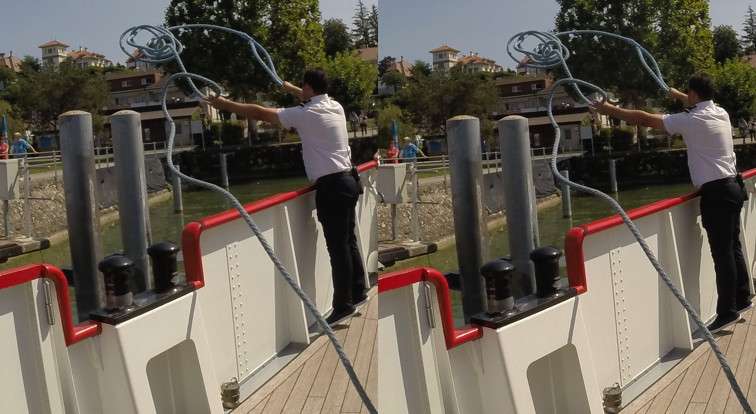
The Base of 34mm/1.34in and the wide angle objectives allow you to take photos in a very close position to the objects. As a GoPro newbie you will choose a “normal” distance, but with time you will go closer and closer.

Waterproof Housing. Another strength is the waterproof case. You could dive with it, but it is also a great advantage for bad weather photography and for holidays at the shore. You are able to take pics very close to the (salt-)water or even in it.

Fully automated picture taking. Place the system in unusual positions to take photos and enjoy being free from having to observe any control screens. This way you’re able to concentrate on the subject, creating fantastic pictures. The automatic system works great by day and by night.
A night shot from Paris (without the use of a tripod)

Remote control. The system can be alternatively managed via the original GoPro Wi-Fi remote control (included accessory with every new camera) or over the GoPro app on mobile devices, which also includes the nearly-live range finder view. In my opinion, these options are especially useful when working with a tripod.
Here you see a tripod-based stereo, which I triggered using the smartphone in my right hand:
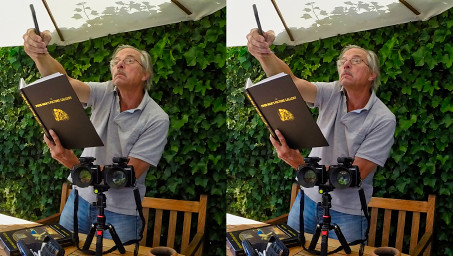
And, as you can see, it is also easy to take just an ordinary selfie with this rig:

Conclusion
After a short time of adaptation, the GoPro Dual system is a well-valued companion for a wide range of stereo shooting occasions. The system is compact, sturdy and also quite discreet in use. There is one thing to address: You will often forget to turn off the rig after shooting. So make sure that you always have a couple of reserve batteries with you.
Bonus anaglyph:

Our dog feels always a little bit unsure when he looks into the two “eyes” of the GoPro system.
About the Author: Living in Zurich, Switzerland as a passionate collector of stereoscopy (Instagram: @historic_stereofoto_collector) and stereographer (Instagram: @thomas.asch_3d_passion), currently using as my main camera rigs: The GoPro Dual system with a small base. The Canon G1X rig and the smaller Sony RX100II rig, both with a light “hyper base”.
Thomas Asch
____________________________________
Rebecca: Yesterday I put one of these systems together from mostly second-hand parts, using Thomas’ recommendations and guidance, and I’m really happy with the results of the photos.
My initial thoughts are: Remember with these GoPros to get closer to the subject than you expect (but not too close!). Note that this rig has a fixed small stereo base; you can always buy a separate rig which allows for a variable baseline between the cameras to use in different situations (but you will lose the fantastic synchronisation as the Wi-Fi remote sync isn’t as good). Anticipate the GoPro’s fish-eye lens distortion; you can find examples online if you’re unsure. There are ways to counter this if required, such as using a filter in Photoshop or Barrel distortion correction in StereoPhoto Maker. Remember that these are not new cameras, so there may be issues with the legacy software and current iOS or Windows OS, especially for 3-D video content. Note that the system mentioned only works specifically with GoPro HERO 3+ Black cameras, there are HERO 3s without the plus and other colours available, but they will not work; also try and check the cameras work before purchasing second-hand. The perfect synchronisation and automatic photo-orientation is amazing, much better than using just a Wi-Fi remote and two GoPros; it works very well with cats who won’t sit still, and that is enough of a reason alone for me to have purchased this kit.
This system is so light, compact and British weather-proof, that I’ll be taking it on a lot of adventures. Thanks Thomas!

Copyright © The Stereoscopy Blog. All rights reserved.
 The Stereoscopy Blog
Amazing, for years I was unsure of the sync of the cameras, and what images would produce. It’s a pity they abandon 3D on the next iterations of their camera.
LikeLike
I loved this system, but once GoPro stopped the GoPro Studio I don’t know what software supports this now?
LikeLike
Good afternoon Steven. I know it’s not quite the same, but I use Photoshop for mine as it has a filter which corrects the fisheye distortion. It’s definitely a pain though having to work on the two halves separately.
LikeLike
Thanks Rebecca, I’ll have a look 👍
LikeLike
Sorry Steven, I forgot to add that I have also used the free software ‘StereoPhoto Maker’ which allows you to correct barrel distortion for the GoPro photos in its ‘Easy Adjust’ tool.
For videos, I’m unsure.
LikeLike
Thanks Rebecca, I don’t actually mind the GoPro fisheye distortion, it can make the centre of the frame pop out a little more, kinda like looking at a balloon.
LikeLike
Definitely! I think StereoPhoto Maker will interest you then, you can import the left and right images into it, and it’ll align them and you can choose your preferred stereo format to save it as: https://stereoscopy.blog/2019/09/08/how-to-use-stereo-photo-maker-basic-tutorial/
LikeLike
I actually used one of these as the basis for a 360 stereo VR rig (with 16 go-pro’s and 16 mewpro’s https://mewpro.cc/ ) it worked reasonably well (for the time) results here: https://www.youtube.com/@0vr894
LikeLike
Does anyone have information about the 3D sync cable? I would like to synchronize multiple H3+B’s. CamDo used to sell cables for this, but don’t anymore.
LikeLike
Hi all! I’ve just dug up m AHD3D-301 – GoPro Stereo rig, and I wonder If anyone has got a copy of the software “GoPro Studio” to edit my footage? /Johan Nylund, Sweden
LikeLike
Hi all, do anyone have the “GoPro Studio” app (for Mac)? I cant find it on my drives any longer, and I’m a bit concerned to download it from “anywhere..”
LikeLike
I am glad the Dual Hero performed so well for you. I remember spending quite a few months trying to get the synch working, but when we did, oh boy, it was worth all the headaches.
Like others, I regret the Hero 4 not being software-compatible with Dual Hero. I was all ready for the Hero 5 sync system, but the Odyssey was the last stereoscopic camera GoPro made. With the camera being end-of-life, that solution (and Omni) was short-lived.
LikeLiked by 1 person
Hello! Sorry to hear the Hero 4 incompatibility. I just planned to put two Hero 4 Black into the Dual Hero but I presume they would fit correctly though sizewise, one wouldn’t synchronize the other by the given cable. All I could do is trying to push their buttons simultaneously and do some extra adjustment in GoPro Studio latter, am I right? Thanks for the note!
LikeLike
The Dual Hero provided line-accurate sync on the two cameras. Without this, there may be temporal artifacts that will break the 3-D depth. To limit the risk of this, avoid anything moving across the frame or panning the rig during shooting. Obviously, if you want video, these limitations are unrealistic.
3-D was only one of the modes for Dual Hero, I remember there were options for all manner of mixed modes, Video + Timelapse, differing FOV etc, but this is all ancient history to me now.
LikeLike
Thank you! Yes, falling leaves and rippling waves are also stuff to avoid among too many others, even when just taking photos. 🙂 I also prefer the 7,5 cm / 3 inch lens distance according to my eyes. I think I’ll rather give a chance to the Acer SpatialLabs Eyes camera.
LikeLiked by 1 person
I used the 3D gopro to make SCUBA videos for several years using the Hero2 system ’til it flooded then the Hero3+ Blacks. It is getting hard to get the cameras and housings now. If you’re shopping on ebay be sure to tripple check the seller has a 3+Black camera. I had to return two because they weren’t identified correctly and were actually 3+Silvers.
I just bought a pair of Hero 12’s and the QR code sync is fairly good, though some shifting is needed in the video editor to line them up perfectly. I mount them on a slide bar and tap on it with a coin to produce a clear pattern of spikes in the audio track that can be used to align them in the video editor.
I use Vegas to edit my videos & it supports 3D well. Premier and Davinci can also be used.
For still images I use 3DCombine or StereoPhoto Maker.
There is also StereoMovie Maker FF but I haven’t used it much.
LikeLiked by 1 person
Thank you so much for the information with the Hero 12s and the apps, much appreciated.
LikeLike
You’re wellcome.
One caveat..the latest update of Vegas, Vegas 21 build 300, trashed the 3D auto align function. You can still tweak the alignment parameters manually, though (I think). If possible try to get Vegas 21 build 208.
It may also be possible to get an earlier version at a discount either through Magix or a Humble Bundle package.
LikeLiked by 1 person
Hi, I actually have the older 3D Hero system for the GoPro Hero HD. Was curious as to whether there’s any major differences between the two.
For the 3D Hero System it seems like all the sync cable does is start and stop the two videos at the same time. It’s up to you to ensure they have the same settings enabled; although it seems to have switched one into Upside Down mode automatically. Some reviews at the time suggested the syncing wasn’t that accurate but once I had everything set up and all the firmware updated to the latest versions it seemed to work pretty well with the software (asides from limited depth of vision).
The actual files were outputted into folders called 101G3D_L and 101G3D_R respectively; the software automatically found both from the same file path when I had both folders copied to my laptop and imported one. I used the suggested software (GoPro Cineform Studio) but I’m guessing if this model follows the same folder conventions it will work just as well with GoPro Studio?
Let me know if there’s anything you’re curious about and I can check it out.
LikeLiked by 1 person