
By Michael Taylor
A few years ago I wrote an article about my use of stereoscopic transparencies, both 35mm and 120 medium format, as an aid to my work as a portrait painter. Ideally I prefer to work from life, but sometimes, particularly with commissioned portraits where the sitter’s time is limited, the use of stereo can make all the difference. Viewers mounted on an armature next to the easel can provide a very useful virtual sitter as back up.
Recently, feeling frustrated by the need to obtain and develop transparency film at short notice, I took some digital stereos of my subject intending to print them. After editing and checking them on an iPad mini with an OWL viewer, I was surprised to see that viewed this way they were every bit as usable as transparencies, and in some ways better. Using a Fuji X100S sequentially, and shooting in RAW meant I could pull plenty of detail out of the shadows and highlights with good control of the colour. Excited by the potential, I needed to quickly find a way of mounting the iPad and viewer for hands free use as it was proving fiddly and difficult to access the touch screen and align the viewer, all while holding a palette and brushes.
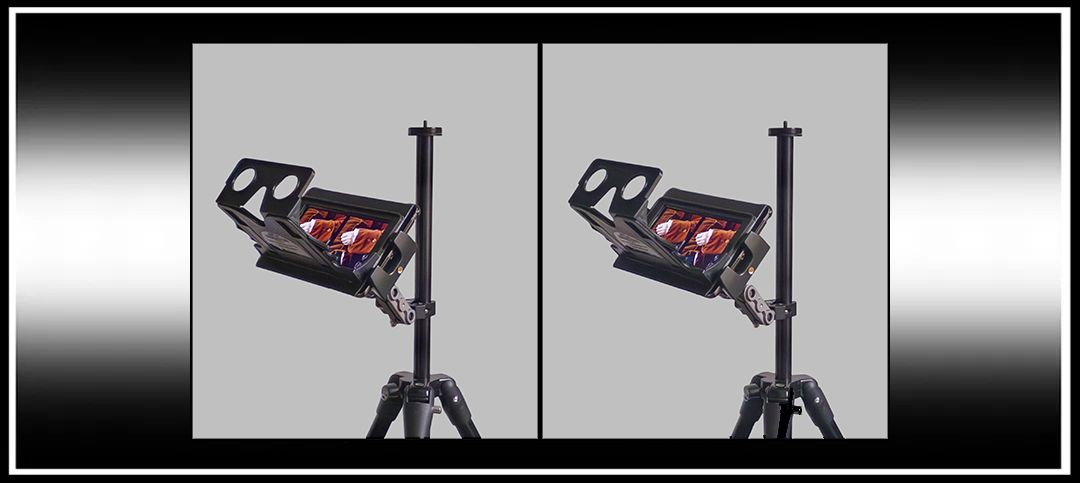
Mounting the iPad was simply achieved with a tablet holder fitted with an adjustable arm clamped to a tripod (Fig. 1… £20 from Amazon).

To mount the Owl viewer I utilised an old iPad case. Placing the viewer (one of the newer versions with the larger aperture) on the centre of the folding case lid (Fig. 2), I drew lines down either side and around the opening. I then removed the sides with a craft knife (to prevent the clamp’s jaws snagging on them) and cut out the centre so that when closed you could see the screen through the opening (Fig. 3).


The viewer was then attached with double sided sticky tape, which also kept the folding lid rigid. This lid and viewer will now hinge up as one, giving easy access the screen and home button, while realigning perfectly when dropped back down (Figs. 4 & 5).
As the magnets in the lid lock the screen every time it closes, it is necessary to put the iPad in the case the wrong way round, which meant a further cut out in the edge to give access for the charging cable if needed. (Note: I now realise that his stage is unnecessary. I had to make mine in haste for a job, and forgot that you can simply turn auto lock off in settings!)


The iPad mini Retina screen is high enough resolution even under magnification to nicely render every detail of texture. However, although the screen is slightly too wide for comfortable viewing, it is an easy matter to add suitably wide black borders, either in StereoPhoto maker or any other photo editing program. I used the black ‘Expand’ tool in Snapseed on the iPad but in future will probably just increase the borders setting in SPM.
I can now arrange my reference stereos in a folder and just swipe between them while working. Using transparencies used to mean multiple viewers and an awful lot of fiddling about finding the right slide, getting paint on them or dropping them on the floor.It also of course makes a nice handy digital viewer for everyday use. Older iPad minis can be picked up pretty cheaply, but avoid early lower resolution screens. Any iPad Mini 2 since 2013 should be fine.
Finally, I have to admit that for sheer beauty of viewing experience this is never going to top medium format transparencies, but it comes a close and very useful second.

Copyright © The Stereoscopy Blog. All rights reserved.
 The Stereoscopy Blog