
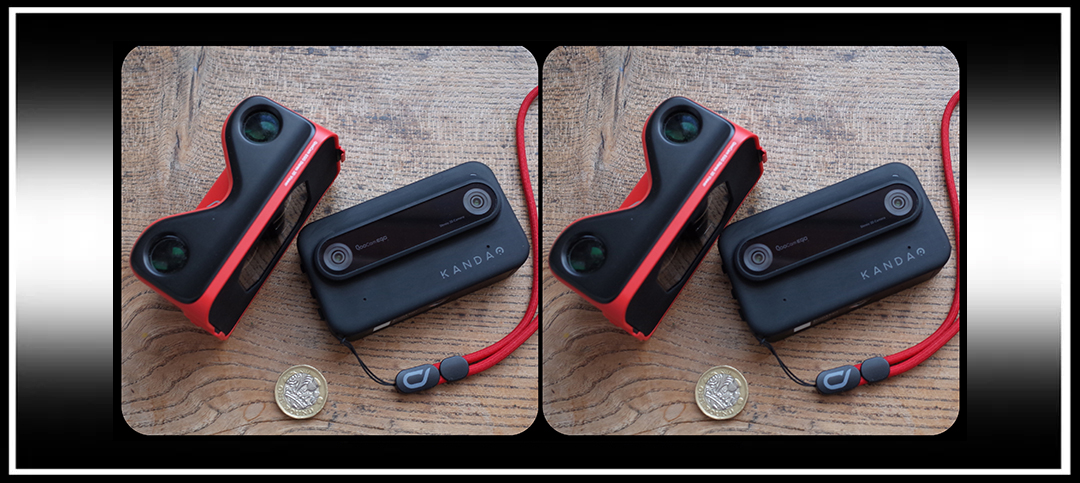
I’ve had this little stereo camera for nearly a year now, and in that time it has benefited from several firmware updates, with more promised for the future. The latest has considerably improved it in use, so when Rebecca asked if I would write an account of my experiences with it, I felt now would be as good a time as any.
Before I get too critical, I should begin by saying that I like the Kandao QooCam Ego a lot; it is a neat, well made, very compact device that takes mostly very good stereo pictures (and video) and as a result I find myself taking it with me wherever I go, which I suppose says as much as anything.

Fig. 1.
For those unfamiliar with it, the QooCam Ego is a nicely built extremely compact stereo camera with a detachable viewer. The two f1.8 27mm (equivalent) lenses with 1/2 inch sensors produce side-by-side JPEGs. These are easily edited straight from the camera either in SPM or by turning on the ‘Hotspot’ and connecting your smartphone with the app provided. Via the app you can then adjust convergence, format, add (largely pointless) filters, or remotely control shooting. DNG is promised in a future firmware update. For me the side-by-side format is a welcome alternative to the MPO files delivered by the Fuji W3 which I can find rather annoying.
The 2.54-inch touchscreen (1600×1440 pixels) display is mono until you clip on the accompanying viewer when magnets trigger the screen to split into a horizontal top to tail pair which the viewer then combines into an impressively immersive stereo image. Using the viewer enables live-view 3D while shooting, with the focus zone selection controlled via the forward/back buttons.
Early versions had a woefully slow start up, which the latest firmware update (v 2.7.10) has done absolutely nothing to improve this alas…..in fact I think it may have got a little worse! Mine takes a full 11 seconds after pressing power on before the screen lights up with the QooCam logo, and then a further 19 seconds before it is ready to shoot. The battery life hasn’t got any better either, but at least there is now a sleep icon (I’m not sure when that was added, but it can be assigned to the function icon in settings) that swiftly puts everything into low power mode, saving the battery but keeping the camera ready to use. I got over an hour out of it this way, taking a picture every few minutes. The battery warning light goes red rather early, but I kept shooting for about 10 minutes with it on 7%. Extra batteries are a very good idea, but are only available from Kandao.
The good news is that the latest firmware has added autofocus to the range of zone focus settings, which are now: Auto, 0.9 to1.2ft, 1.2 to1.5ft, 1.5 to1.9ft, 2.8 to 5.3 ft, 4.2 to15.3 ft, and 6.8 ft to infinity. When the autofocus icon is selected the camera automatically finds an area to focus on (using edge contrast), or you can tap the screen to select the focus point. Again, it takes an age to lock on, but once the square stops flashing and goes green it is pretty reliable with no discernable difference between left and right images (Fig 2, with crops 2a & 2b). Although slow, once set it has the good grace to hold that focus for subsequent shots until you tap the screen again to reset.

Fig. 2

Fig. 2a

Fig. 2b
Image quality is good, with exposure well controlled, although the generally pleasing white balance can occasionally be inconsistent between shots (which DNG will sort out). There is a useful exposure compensation option of +/- two stops for awkward lighting conditions. The fixed 17mm lenses exhibit impressively low distortion and are sharp from corner to corner. (Fig 3)

Fig. 3.
The autofocus coped surprisingly well in lowish light and the detail was impressive when shooting handheld in the rather gloomy interior of Stinsford Church. (Fig 4, with crops 4a & 4b) Using auto exposure in low light needs a tripod as the camera just pushes the shutter speed right down, but in sport mode, which is shutter priority, you can set it to 120th or 250th sec so it then controls the exposure with a higher ISO, giving good results at around 1500 ASA.

Fig. 4.

Fig. 4a.

Fig. 4b.
Base length (distance between lens centres) is only a tad over 6.5 cm, which is roughly human interpupillary average. This is less than most traditional stereocameras, which tend to favour slightly exaggerating depth, so stereoscopic compositions with the Ego work best if you include some stuff in the fore and middle-ground to lead the eye in.
I initially wondered what the point of the close focus option was with a fixed base length, but in use it meant I was able to take sequential stereos of closer non moving subjects right down to 1ft. I was happy with the accuracy of the auto-focusing on the padlock. (Fig 5 & crop 5a) This also means that if you hold it vertically you get a pair of upper and lower views to choose between (shades of T R Williams!). (Fig 6)

Fig. 5.

Fig. 5a.

Fig. 6.
With the viewer clipped on and shooting in live-view stereo, selecting the ‘auto’ icon will set the focus, but as you can’t get to the screen with the viewer attached I couldn’t find a way to reset it without going to macro then back again to auto (but I may be missing something). Incidentally, as you need to look vertically down into the viewer to frame shots you can’t wear a hat or have untidy hair (guilty both) as they get in front of the lenses! (Fig 7)

Fig. 7.
Finally, the new firmware update has added a welcome slide show mode to playback in intervals of 1 to ten seconds, with content arranged in folders, or selected favourites. This cuts down fiddling about with the hard to find and difficult to operate buttons during playback, and makes a nice way to hand round and share content. Incidentally, I have found it helpful to stick small foam pads on the back/forward/playback buttons to assist with locating and operating them while looking through the viewer. The screen is good, and looks surprisingly un-pixilated under the relatively high magnification of the viewing lenses.
Used in real life shooting conditions, the autofocus sometimes gets confused, as it did several times with the roses below, so I changed to the zone, or hyperfocal settings, which in this case was 2.8ft to 5.3ft, EV minus 0.7 (Fig 8 & crop 8a)

Fig. 8 (Zone focus 2.8 to 5.3 ft)

Fig. 8a.
In most shooting conditions, particularly involving people the 4.2 to 15.3 ft setting gives reliably consistent results.
In conclusion, I find this is a really useful reasonably priced stereo camera and was well worth the money. If you take your time (not much choice with this one) and don’t treat it as a point and shoot compact, it will consistently reward you with good stereo images and video.
Things I would like to see in future updates? A quick 100% zoom option to check the focus would be nice for a start. You can’t tell if you’ve nailed it until downloaded.
I will end with a selection of random test stereos taken on the hoof during recent outings. I was pretty pleased with the results, and the autofocus proved mostly reliable, with only a handful of errors, making everything much more streamlined than before, with less lost pictures from forgetting to reset the focus zones. I also found it very convenient to be able to make a selection for a slide show to show my brother-in-law later (he asked!) without the ever present stereoscopist’s hazard of boring him to tears.
The stereos straight out of the camera are borderless with no ‘window’ (Fig 9), so for ease of viewing I have run the other images for this review through StereoPhoto Maker. Any other editing such as sharpening or levels adjustment I have kept to an absolute minimum.

Fig. 9.
The video files (which seamlessly insert into slide shows) are also in a convenient side-by-side format and seem very good me, but as video is not really my bag, I’ll leave that for somebody else to cover.
Thank you to Rebecca for asking me to do this and the opportunity to learn a few things along the way, but especially for giving all us stereotypes the Stereoscopy Blog.
Michael Taylor
More examples:


#StereoscopyDay

Copyright © The Stereoscopy Blog. All rights reserved.
 The Stereoscopy Blog
Hi Rebecca & Michael, I love the Stereoscopy Blog! I’ve had the following 3D equipment over the years: Sony HDR-TD10 in 2011 (returned within 2-week trial period to Sony Store), GoPro AHD3D-301 Dual Hero 3+ Black system in 2021, Sony HDR-TD30 in Sept.2025 and finally the Kandao QooCam EGO on Nov.23, 2025 from Yodabashi Camera in Tokyo. I still have my two 3DTVs: The Sony XBR-52LX900 and Samsung UN46D6900WFXZA.
I’m really enjoying my EGO camera, especially after updating to the latest firmware & installing the QooCam Studio software for Windows 10. The EGO is a very easy to use point & shoot 3D camera. I’ve taken both photos & video with great results. The very odd time, a few of my photos weren’t totally focused, but video was always fine. Considering I started using the EGO the day after I bought it while I was in Japan, I had a lot of fun using it! Yes, startup is slow and there really isn’t much control of light exposure other than by adjusting Autofocus & the EV +/-, but everything turned out fine after some trial & error.
I know it’s not true 4K resolution, but since I still have my 1080p 3DTVs, viewing on these is just fine! I also purchased the XReal One Pro smart glasses (October 2025) which are the real game changer in viewing photos & videos taken by the EGO, and anything taken by my previous 3D equipment. The 3D just pops out in these glasses & there is not parallax distortion at all, plus I can use these glasses to monitor the camera output on my DJI Mini 5 Pro drone.
Keep up the great work Rebecca! Merry Xmas & Happy New Year!
LikeLike
Good morning Ramon,
Thank you, I hope you had a great Christmas too and best wishes for the new year! It’s really interesting and happy to hear you’re enjoying the QooCam EGO, especially with your experience of other 3-D cameras for videos and stills. I don’t have the XReal glasses myself, but my friend does, who also has a QooCam EGO, an XReal Beam Pro phone and an Acer Spatial Labs Eyes, and I don’t think he’s used the glasses for more than one day, I’ll have to tell him to try them again. I’ve seen the QooCam EGO 2, if it ever is released, does not have a snap-on viewer, so maybe they are also thinking glasses are the way forward.
Thank you so much for taking the time to leave a reply, it’s very much appreciated.
Take care,
Rebecca
LikeLike